
Download Meta Search – Free File Tagging, Retrieval & Organization Tool
What Is Meta Search and Why It Matters
Meta Search is a free file‑labelling and retrieval software designed to bring order to the chaos of modern digital storage. Whether your documents live on a local hard drive, a cloud service like Dropbox or Google Drive, or even tucked away inside email attachments, Meta Search scans every corner, assigns meaningful keywords, and builds a searchable index that works like a personal Google for your own files. The application’s core promise is simple: stop wasting time hunting for that spreadsheet, photo, or contract and start finding it in seconds with a single search term.
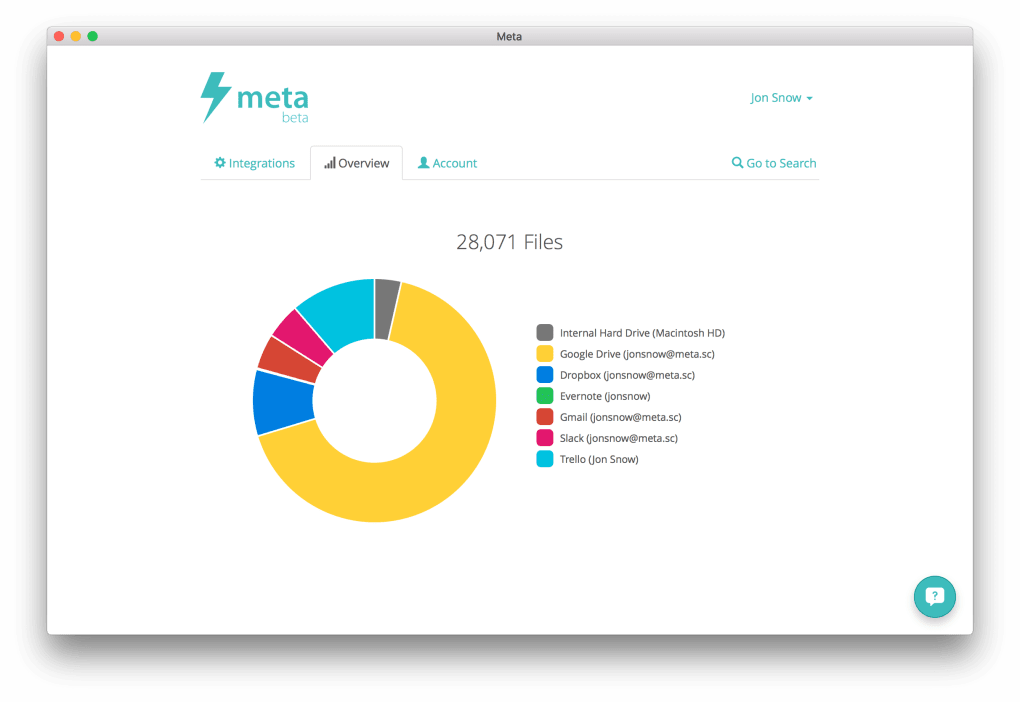
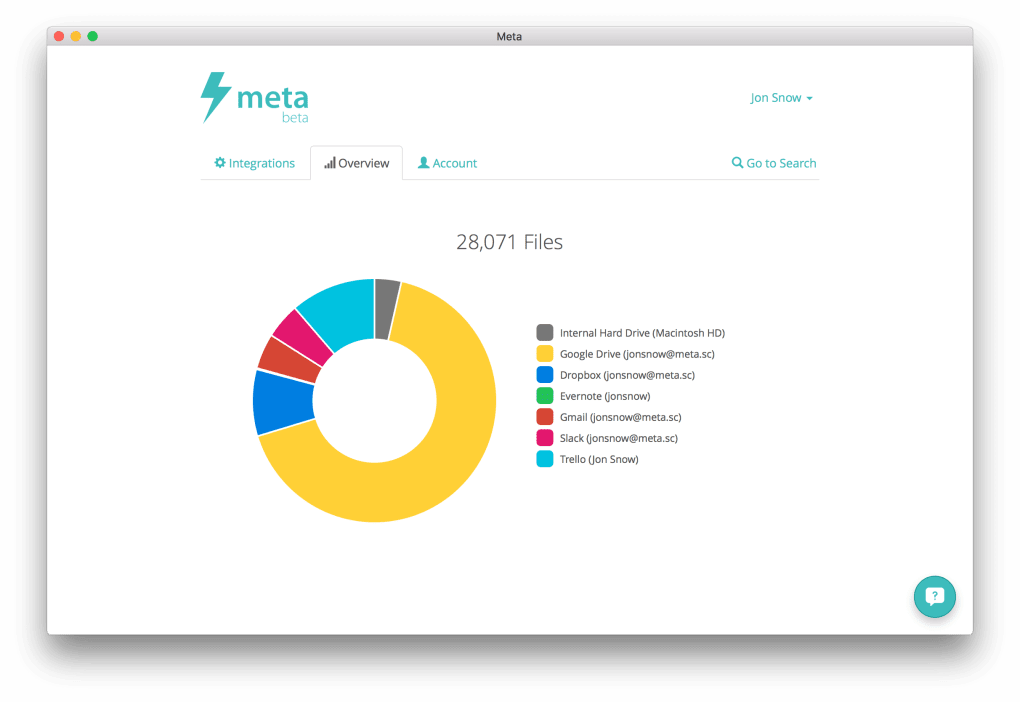
In today’s multi‑device world, files are scattered across Windows PCs, macOS laptops, Android tablets, and iOS phones. Traditional folder hierarchies quickly become outdated, and the “Downloads” folder often turns into a black hole of forgotten data. Meta Search solves this problem by continuously monitoring selected locations, extracting metadata, and applying user‑defined tags. The result is a unified view of all your data, complete with visual graphs that show where the bulk of your storage resides.
Beyond basic searching, Meta Search offers a sleek interface that lets you filter results by tag, date, file type, or storage location. You can even create custom tag sets that align with your workflow—think “Project‑Alpha”, “Invoices‑2024”, or “Travel‑Photos”. The software runs quietly in the background, updating its index in real time, so you always have the latest snapshot of your digital universe at your fingertips.
Core Features That Set Meta Search Apart
- Universal Scanning: Indexes local drives, network shares, email servers, and popular cloud services (Dropbox, Google Drive, OneDrive).
- Smart Tagging Engine: Automatically generates keyword tags from file names, metadata, and content analysis.
- Custom Tag Creation: Users can define their own tags and apply them in bulk or individually.
- Dynamic Search Bar: Real‑time suggestions appear as you type, narrowing results instantly.
- Visualization Graphs: Interactive charts display storage distribution by file type, tag, or location.
- Secure Indexing: All indexing data is stored locally and encrypted, ensuring privacy.
- Lightweight Background Service: Minimal CPU and RAM footprint, even during large scans.
- Cross‑Platform Compatibility: Runs on Windows 10/11, macOS 10.15+, and offers companion mobile apps for Android and iOS.
- Free with Optional Premium Add‑Ons: Core functionality is free; advanced analytics are available as paid upgrades.
- Regular Automatic Updates: Keeps the tagging algorithms and security patches up to date without user intervention.
Why These Features Matter
The combination of automatic tagging and manual control gives power users and casual users alike a flexible way to keep their files organized. For example, a marketer can tag all campaign assets with “Q4‑Launch”, while a student can simply rely on the automatic metadata extraction to group lecture notes by course code. The visualization graphs also provide a quick audit of storage health, helping you identify redundant files or oversized folders before they become a problem.
Because Meta Search stores its index locally and encrypts it, you never have to worry about sensitive corporate data being sent to an external server. This security‑first approach makes the tool suitable for both personal use and enterprise environments where data compliance is critical.
Getting Started: Installation, Compatibility, and Daily Use
Meta Search offers a straightforward installer for each supported operating system. Follow the steps below to get up and running in under five minutes:
Step‑by‑Step Installation
- Visit the official Meta Search website and click the “Download for Windows” or “Download for macOS” button.
- Run the downloaded installer (MetaSearchSetup.exe or MetaSearchInstaller.pkg). The wizard will guide you through the standard acceptance of terms and selection of install location.
- During setup, you’ll be prompted to choose which folders, drives, or cloud services you want to index. You can add or remove locations later from the Settings panel.
- Complete the installation and launch Meta Search. The application will perform an initial scan, which may take a few minutes depending on the volume of data.
Supported Platforms
Meta Search is built on a cross‑platform framework, ensuring consistent performance on:
- Windows 10, Windows 11 (64‑bit)
- macOS 10.15 Catalina and later (including Apple Silicon)
- Android 8.0+ (via companion app)
- iOS 13+ (via companion app)
The desktop version integrates tightly with the native file explorer, allowing you to right‑click any file and instantly add or edit tags. Mobile apps sync the index over a secure local network, giving you on‑the‑go search capabilities without sacrificing privacy.
Daily Workflow Tips
Once installed, using Meta Search is as simple as typing a keyword into the search bar. The results list includes a preview thumbnail, file path, and associated tags. You can refine results with filter dropdowns or by clicking on a tag directly, which will instantly narrow the view to all files sharing that label.
For power users, the “Batch Tag” feature lets you select multiple files and apply a tag in one click. You can also create “Smart Collections”—dynamic groups that automatically include any file matching a specific tag or file type, similar to smart playlists in music apps.
Because the index updates continuously, any new file added to a monitored folder is tagged within seconds, ensuring your search results are always fresh. The optional premium add‑on provides deeper analytics, such as duplicate detection and storage cost forecasting, but the free version already covers the essentials for most personal and small‑business users.
Pros, Cons, Frequently Asked Questions, and Final Thoughts
Pros
- Completely free core version with no hidden fees.
- Automatic and manual tagging offers flexible organization.
- Supports a wide range of storage locations, including email servers.
- Lightweight background operation does not slow down the PC.
- Secure, locally encrypted index protects sensitive data.
- Intuitive UI with visual graphs for quick storage audits.
Cons
- Initial full‑system scan can be time‑consuming on very large drives.
- Advanced analytics require a paid upgrade.
- No built‑in file duplication remover (must be handled manually).
- Mobile apps currently lack the full graphing capabilities of the desktop version.
FAQ – Answers from the Meta Search Team
Is Meta Search really free?
Yes, the core application is completely free. All essential tagging, searching, and visualization features are available at no cost. Optional premium modules for deep analytics are offered on a subscription basis.
Can Meta Search index encrypted files?
Meta Search can read the metadata of encrypted files if you have the decryption key unlocked on your system. The index itself is stored encrypted, ensuring no plaintext data is exposed.
How does the software handle cloud storage?
Meta Search connects to cloud services via their official APIs (Dropbox, Google Drive, OneDrive, etc.). It pulls file metadata and content hashes without downloading the full files, keeping the process fast and bandwidth‑friendly.
Will Meta Search slow down my computer?
The application is designed to run as a low‑priority background service. During an initial scan you may notice a temporary CPU spike, but once the index is built, resource usage drops to less than 5 % of CPU and a few megabytes of RAM.
Is there a way to export my tags?
Yes, Meta Search includes an export function that generates a CSV file containing file paths, tags, and timestamps. This can be useful for audits or migrating to another tagging system.
Conclusion – Should You Download Meta Search?
Meta Search delivers on its promise of turning a chaotic file landscape into a searchable, well‑organized repository—all without costing you a dime for the essential features. Its universal scanning, smart tagging engine, and visual analytics make it a valuable addition for anyone who juggles multiple storage locations, whether on Windows, macOS, Android, or iOS. While the initial indexing may require patience and the premium add‑ons are optional, the free version already provides a robust solution that can save hours of wasted searching each week.
Ready to reclaim control over your digital assets? Download Meta Search now and experience a faster, smarter way to locate every file, photo, or document you own.
Meta Search offers a compelling mix of automation and user control, making file retrieval effortless. Its free core version is generous, and the optional premium modules add depth for power users.






